Use paper first when ideas are fuzzy, then move to FigJam or a similar whiteboard when the team needs shared memory, voting, and remote input. That simple split keeps UX ideation fast without turning every sketch into a software setup ritual. Paper is still the quickest way to think with your hands. FigJam is better when choices must be captured, compared, and replayed later.
TLDR: Paper wins for speed, low pressure, and messy early thinking. FigJam wins for remote teams, structured workshops, and keeping decisions visible after the meeting. For example, a five-person product team might sketch 30 interface ideas on paper in 20 minutes, then upload the best eight into FigJam for comments and dot voting. In one common workflow, teams can cut workshop cleanup time by 40% because notes, votes, and next steps already live in one shared board.
Why paper still refuses to die
Paper is brutally efficient. No login. No template picker. No permissions error. No teammate asking, “Can you see my cursor?” You grab a pen and start. That matters in UX because early ideas are fragile. If the tool feels too polished, people start acting polished too.
With paper, bad ideas feel cheap. That is a feature. A designer can sketch five onboarding flows in the time it takes another person to resize sticky notes on a digital board. Product managers can draw boxes without apologizing for their lack of visual style. Engineers can mark edge cases in the margin. The whole room gets looser.
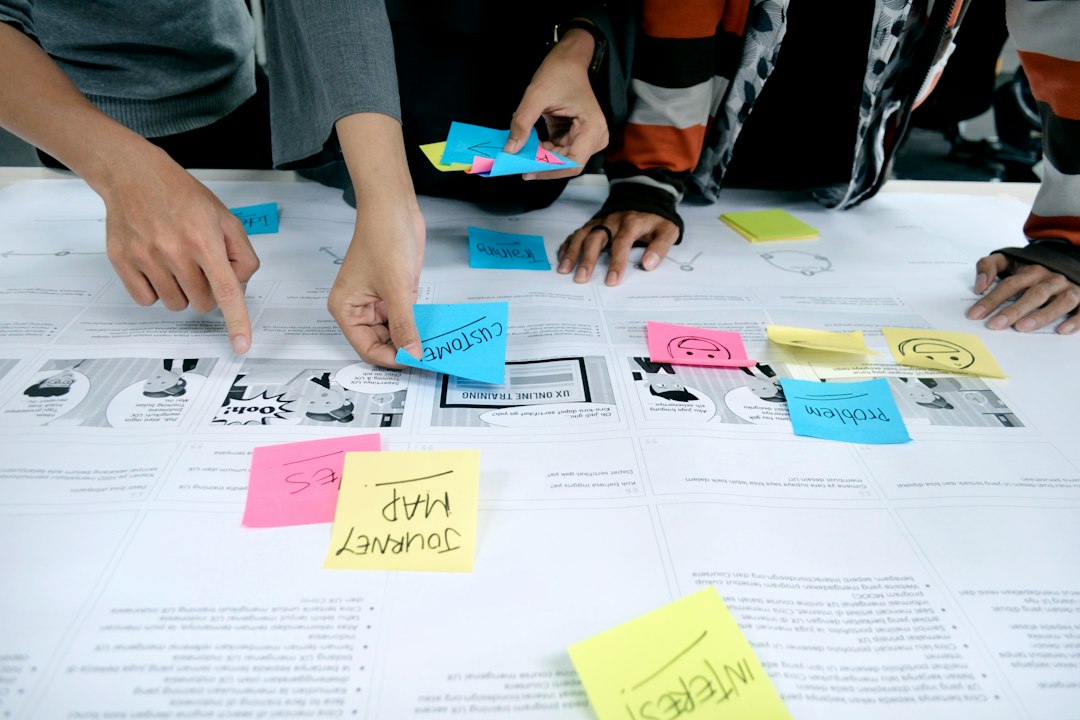
Paper also helps with spatial thinking. You can spread screens across a wall, cluster flows by task, and circle awkward transitions. The body gets involved. People stand up, point, swap sheets, and argue in a useful way. That tactile quality is hard to copy with a mouse.
Still, paper has real limits. Remote teammates get second-class access. Photos of sketches often look like evidence from a badly lit crime scene. Version history is basically “who took the stack home?” And once the workshop ends, someone has to convert raw sketches into digital artifacts. Expect to waste time on this if the team does not plan for it.
Where FigJam earns its place
FigJam is built for collaborative UX ideation. It is not just a blank canvas. It gives teams sticky notes, stamps, timers, voting, sections, comments, widgets, and easy movement into Figma design files. That last part is huge for product teams already using Figma. Ideas do not have to be recreated from scratch.
FigJam is especially strong for remote and hybrid teams. Everyone can contribute at the same time. Quiet people can type instead of fighting for airtime. Workshop facilitators can use timers and voting to keep sessions from turning into endless debate. Decisions become visible, not trapped in a meeting recording nobody will watch.
- Best for: remote ideation, design critiques, journey mapping, prioritization, sprint planning.
- Weak for: ultra-fast solo sketching, early private thinking, people who freeze in polished digital spaces.
- Big advantage: work stays searchable and shareable after the session.
Honestly, it feels like FigJam can make simple tasks feel one step too formal. Moving between modes, panels, and objects adds friction. A quick doodle that takes three seconds on paper may take twelve seconds with a trackpad. That sounds tiny. Across a 60-minute ideation session, it changes the mood.
Paper vs FigJam: the practical comparison
The right choice depends on the moment in the UX process. There is no universal winner. There is only a better fit for the current task.
| Criteria | Paper | FigJam |
|---|---|---|
| Speed of sketching | Excellent | Good |
| Remote collaboration | Poor | Excellent |
| Workshop structure | Loose | Strong |
| Archiving work | Weak | Strong |
| Creative freedom | Very high | High, but more tool-shaped |
Use paper when you need speed and low judgment. Use FigJam when you need alignment. Paper helps people generate options. FigJam helps people compare them.
Other tools worth considering
FigJam is popular, but it is not alone. UX teams often mix tools based on company setup, workshop style, and budget.
- Miro: A strong choice for large workshops, research synthesis, service blueprints, and product planning. It has a vast template library. It can also feel heavy when all you need is a quick sketch.
- Microsoft Whiteboard: Useful for teams already living inside Microsoft 365. It is simple and accessible, though less refined for UX-specific workflows.
- Lucidspark: Good for structured brainstorming, flow mapping, and teams that care about diagrams. It fits well with Lucidchart users.
- Whimsical: Fast and clean for flowcharts, wireframes, and lightweight maps. It is less chaotic than some whiteboards, which can be a blessing.
- Mural: Strong for facilitated workshops and enterprise collaboration. It suits teams that run repeatable design thinking sessions.
- Procreate or Concepts: Better for designers who sketch on tablets. These are great for expressive interface ideas, but weaker for group editing.
The annoying part is tool overlap. FigJam, Miro, Mural, and Lucidspark all promise brainstorming, mapping, and alignment. The real difference is often less about features and more about team behavior. If nobody cleans the board, any tool becomes a junk drawer. If nobody frames the activity, the workshop drifts.
A smart hybrid workflow
The best UX ideation process often uses both paper and digital boards. Start rough. Then organize. Do not force one tool to do every job.
- Frame the problem in FigJam. Add the goal, constraints, user segment, and success metric.
- Sketch individually on paper for 10 to 15 minutes. No talking. No judging. Quantity first.
- Upload or photograph the best sketches. Keep the messy context, but make it visible to the group.
- Cluster ideas in FigJam. Group by user goal, screen type, risk, or expected value.
- Vote and discuss. Use dot voting, but do not blindly follow the highest count. Ask why people voted.
- Convert winners into low-fidelity wireframes. Move from FigJam into Figma, Whimsical, or another wireframing tool.
This workflow gives paper the space to create and FigJam the job of preserving decisions. It also reduces the pressure to make early ideas beautiful. Ugly sketches can still carry sharp thinking.
When paper is the wrong choice
Paper struggles when the team is distributed across time zones. It also fails when work must be reused across multiple sessions. If a product trio in Berlin, Toronto, and Austin needs to review onboarding concepts asynchronously, paper becomes clumsy fast.
Paper is also weak for accessibility. Digital boards can offer zoom, typed text, screen sharing, and cleaner contrast. Not perfect, but often better than marker scribbles on a wall. If team members need assistive tech, digital tools may be the only realistic option.
When FigJam is the wrong choice
FigJam is less useful when people are still trying to understand the problem privately. A shared board can create performance anxiety. People may edit themselves too soon. The cursor crowd can also get distracting. Nothing kills a rough idea like five avatars hovering nearby.
It also depends on facilitation. A messy FigJam board can become a landfill of sticky notes. Someone needs to name sections, set timers, write prompts, and cut off rambling debates. The tool supports collaboration, but it does not create clarity by itself.
How to choose for your next UX session
Pick paper if the goal is idea volume. Pick FigJam if the goal is shared understanding. Pick Miro or Mural if you need a larger workshop space with many activities. Pick Whimsical if the output should become a clean flow quickly.
A useful rule: if the work will be thrown away in an hour, paper is probably fine. If the work will shape a roadmap, sprint, or design file, capture it digitally. For many teams, the strongest setup is not paper versus FigJam. It is paper before FigJam.
UX ideation works best when tools stay out of the way. Paper gives teams permission to think badly before they think clearly. FigJam turns those rough thoughts into something a team can sort, challenge, and act on. Use each for what it does best, and the whole process feels lighter.