Drones have transformed the way we see the world, turning everyday landscapes into cinematic masterpieces from the sky. But while a drone’s camera and hardware matter, it’s the flight control app that often determines whether your footage feels amateur or truly breathtaking. Modern drone flight control apps combine intelligent automation, real-time data, and creative tools to help both hobbyists and professionals capture stunning aerial footage with pinpoint precision.
TL;DR: Drone flight control apps are essential for capturing smooth, cinematic, and precise aerial footage. They offer intelligent flight modes, waypoint planning, live telemetry, and automated safety features that dramatically improve results. Popular apps like DJI Fly, Litchi, Autel Sky, and DroneDeploy each offer unique strengths depending on whether you’re shooting cinematic content, mapping terrain, or performing inspections. Choosing the right app can elevate your drone work from simple flying to professional-grade storytelling.
Why Flight Control Apps Matter More Than Ever
In the early days of consumer drones, flying was largely manual and required steady hands and lots of practice. Today, smart flight control apps act as co-pilots. They help automate complex maneuvers, stabilize camera movements, and optimize positioning for the best possible shot.
These apps connect directly to your drone’s firmware and camera systems, allowing you to:
- Plan precise flight paths before takeoff
- Track moving subjects automatically
- Maintain perfect altitude and framing
- Adjust camera settings in real time
- Monitor battery, wind, and GPS data
Instead of focusing solely on piloting, you can shift your attention to composition, storytelling, and creativity.
Core Features That Elevate Aerial Footage
Before diving into specific apps, it’s important to understand the features that truly make a difference in professional-grade footage.
1. Intelligent Flight Modes
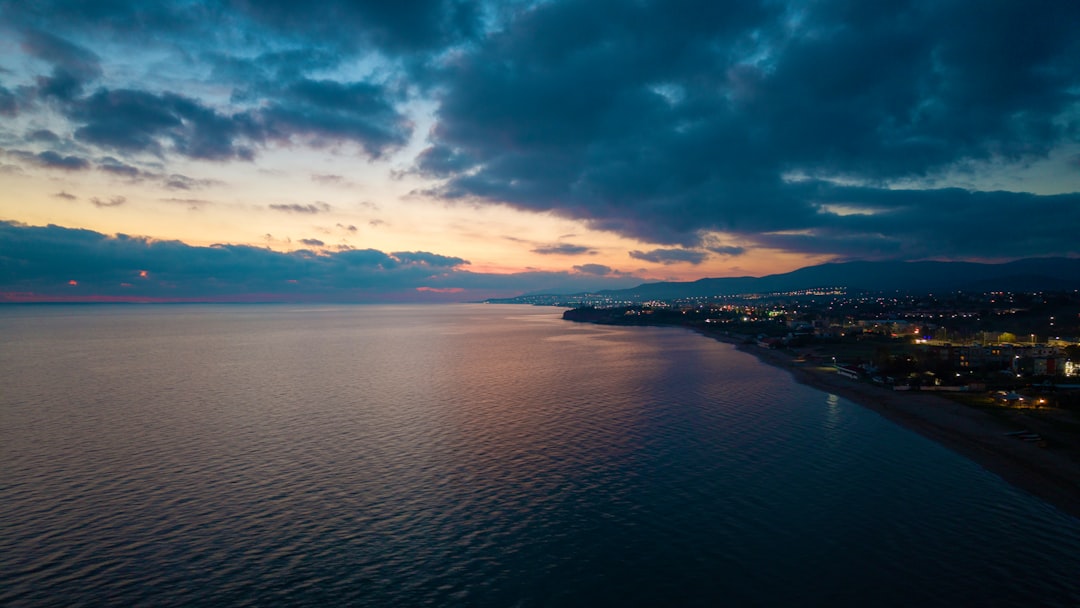
Features like Follow Me, Point of Interest, Orbit, and Active Track make it easy to create dynamic shots once only possible with helicopters.
For example:
- Orbit Mode creates smooth circular movements around a subject.
- Waypoint Missions repeat the same flight path precisely for consistent results.
- Tracking Modes lock onto cars, boats, or people in motion.
2. Waypoint Planning
Waypoint functionality allows you to predefine GPS coordinates, altitude, speed, and camera angle. This is invaluable for:
- Real estate showcases
- Construction progress tracking
- Landscape time-lapse projects
- Film scene retakes
With waypoint planning, you can recreate identical shots over days or even months.
3. Real-Time Telemetry and Safety Controls
Precision requires awareness. Advanced flight apps provide live data including:
- Satellite count and signal strength
- Wind warnings
- Obstacle alerts
- Battery health and return-to-home position
This data ensures safer flights and more stable footage.
Top Drone Flight Control Apps Compared
Several leading flight control apps dominate the market. Each has strengths depending on your drone model and creative goals.
1. DJI Fly & DJI Go 4
Designed for DJI drones, these apps are known for their user-friendly interface and powerful intelligent modes. They are ideal for beginners and professionals alike.
Best for: Cinematic shots, social media content, travel videography
2. Litchi
Litchi is a powerful third-party app compatible with many DJI drones. It shines in advanced waypoint planning and mission design, providing greater customization than stock apps.
Best for: Complex flight paths, repeatable cinematic sequences
3. Autel Sky
Autel’s native app pairs with Autel EVO drones and provides robust tracking, adjustable camera parameters, and intuitive design.
Best for: High-resolution video and commercial drone operators
4. DroneDeploy
More than a cinematic tool, DroneDeploy specializes in mapping, surveying, and 3D modeling. It’s heavily used in agriculture, construction, and inspections.
Best for: Mapping, analytics, industrial applications
5. Pix4Dcapture
Similar to DroneDeploy but often more customizable for photogrammetry projects, Pix4Dcapture is favored by professionals needing precision mapping data.
Best for: Surveying and terrain modeling
Comparison Chart
| App | Best For | Waypoint Planning | Tracking Modes | Mapping Features | Skill Level |
|---|---|---|---|---|---|
| DJI Fly / Go 4 | Cinematic video | Yes | Advanced | Limited | Beginner to Pro |
| Litchi | Custom missions | Advanced | Good | Basic | Intermediate to Pro |
| Autel Sky | Commercial filming | Yes | Advanced | Moderate | All Levels |
| DroneDeploy | Mapping and surveys | Grid based | No | Extensive | Professional |
| Pix4Dcapture | 3D modeling | Grid and polygon | No | Extensive | Professional |
How These Apps Improve Cinematic Quality
Stunning aerial footage relies on smooth movements, stable framing, and graceful transitions. Flight control apps enhance all three.
Smooth Automated Motion
Manual joystick movements often produce small jerks. Intelligent automation smooths acceleration and deceleration curves, resulting in buttery cinematic motion.
Image not found in postmetaRepeatable Tracking Shots
Imagine filming a car driving along a coastal highway. With waypoint mapping and subject tracking, you can record multiple takes with identical framing until you capture the perfect lighting.
Perfect Reveals and Climbs
Apps allow you to pre-program gradual altitude climbs combined with gimbal tilts, creating dramatic reveal shots commonly seen in films.
Choosing the Right App for Your Needs
Not every pilot needs industrial mapping tools. Your ideal app depends on your goals:
- Travel vloggers: DJI Fly or Autel Sky offer simplicity and powerful cinematic automation.
- Filmmakers: Litchi provides superior mission customization.
- Surveyors and engineers: DroneDeploy or Pix4Dcapture are essential.
- Real estate photographers: Apps with orbit and waypoint support are ideal.
Compatibility with your drone model should always be your first consideration.
Advanced Tips for Getting the Most From Flight Control Apps
1. Pre-Flight Mission Simulation
Many apps allow you to preview missions virtually. Use this to check path smoothness and camera angles before launching.
2. Adjust Speed Settings Carefully
Slower speeds equal more cinematic results. Even if your drone can move quickly, reducing waypoint speed produces more polished footage.
3. Combine ND Filters with App Controls
Pair smart automation with proper shutter speed settings to maintain motion blur for film-quality results.
4. Use Grid Lines and Exposure Tools
Take advantage of built-in histograms, overexposure warnings, and framing guides.
The Future of Drone Flight Apps
The next generation of flight control apps is integrating AI-powered scene recognition, obstacle prediction, and automated post-processing. Soon, drones may analyze landscapes in real time and suggest optimal flight paths for dramatic composition.
Cloud-connected flight logs and collaborative mission planning are also becoming common, enabling production teams to pre-plan shoots remotely.
Final Thoughts
Drone flight control apps have evolved from simple piloting utilities into full-featured creative platforms. Whether you are capturing sweeping mountain vistas, tracking high-speed action, or mapping terrain for analysis, the right app gives you unmatched precision and control.
The difference between average and extraordinary aerial footage often lies not in the drone itself, but in how intelligently you use its software. By mastering waypoint missions, intelligent modes, and real-time telemetry, you can transform ordinary flights into visually stunning stories told from the sky.
In a world where aerial content is becoming increasingly popular, precision is everything—and the right flight control app is your most powerful creative partner.