
Business software solutions help organizations plan, operate, measure, and improve daily work through digital tools. These solutions can range from simple accounting applications to large enterprise platforms that connect sales, inventory, finance, customer service, and human resources. For many companies, the right software is no longer just a convenience; it is a foundation for speed, accuracy, and scalable growth.
TLDR: Business software solutions are digital tools that help companies automate tasks, centralize data, improve collaboration, and make better decisions. For example, a retail business using inventory and sales software may reduce stock errors by 25% and cut weekly reporting time from 6 hours to 1 hour. Common types include CRM, ERP, accounting, HR, project management, and business intelligence software. The best choice depends on company size, budget, integrations, security needs, and long-term goals.
What Are Business Software Solutions?
Business software solutions are applications or platforms designed to solve specific operational problems or support complete business processes. They may be installed on local computers, accessed through the cloud, or delivered as mobile apps. Their main purpose is to make work more organized, measurable, and efficient.
Instead of relying on spreadsheets, emails, and manual updates, a company can use software to store information in one place, automate repeated actions, and generate reports. For example, a sales team can track leads in a CRM system, while the finance team can monitor invoices in accounting software. When these tools are connected, management gains a clearer view of the entire business.

Main Types of Business Software Solutions
Different businesses require different systems, but several categories are widely used across industries.
- Customer Relationship Management software: CRM systems help companies manage leads, customers, sales pipelines, communication history, and follow-ups. They are especially useful for sales, marketing, and customer service teams.
- Enterprise Resource Planning software: ERP platforms connect departments such as finance, inventory, procurement, operations, and human resources. They are commonly used by growing or large organizations that need centralized control.
- Accounting and finance software: These tools manage bookkeeping, invoicing, expenses, payroll, taxes, and financial reporting. They reduce manual errors and help maintain compliance.
- Human Resources software: HR software supports recruitment, employee records, attendance, benefits, performance reviews, and onboarding. It helps HR teams handle employee data more securely and consistently.
- Project management software: These platforms help teams plan tasks, assign responsibilities, set deadlines, track progress, and collaborate. They are useful for agencies, software firms, construction teams, and internal departments.
- Business Intelligence software: BI tools collect and analyze data from multiple sources. They create dashboards and reports that help leaders identify trends, risks, and opportunities.
- Communication and collaboration software: Messaging, video conferencing, document sharing, and team workspace tools help employees communicate faster, especially in hybrid or remote environments.
- Industry specific software: Some solutions are built for healthcare, real estate, manufacturing, logistics, hospitality, education, or retail. These tools often include specialized workflows and compliance features.
Key Benefits of Business Software Solutions
The value of business software is not limited to saving time. When selected and implemented properly, software can improve performance across the organization.
- Higher efficiency: Repetitive tasks such as invoice creation, stock updates, appointment reminders, and payroll calculations can be automated.
- Better data accuracy: Centralized systems reduce duplicate entries and inconsistent records.
- Improved decision making: Dashboards and reports give managers access to real-time or near real-time business information.
- Stronger collaboration: Teams can share documents, updates, and task progress without searching through long email threads.
- Scalability: A company can add users, features, departments, or locations as it grows.
- Better customer experience: Faster response times, personalized communication, and accurate order tracking can improve customer satisfaction.
- Compliance and security: Many systems include audit trails, permission settings, backups, and regulatory support.
For example, a service company that introduces scheduling software may reduce missed appointments by 30%. A manufacturer using an ERP system may discover inventory shortages earlier and avoid costly production delays. These improvements can directly affect revenue, customer retention, and operational stability.
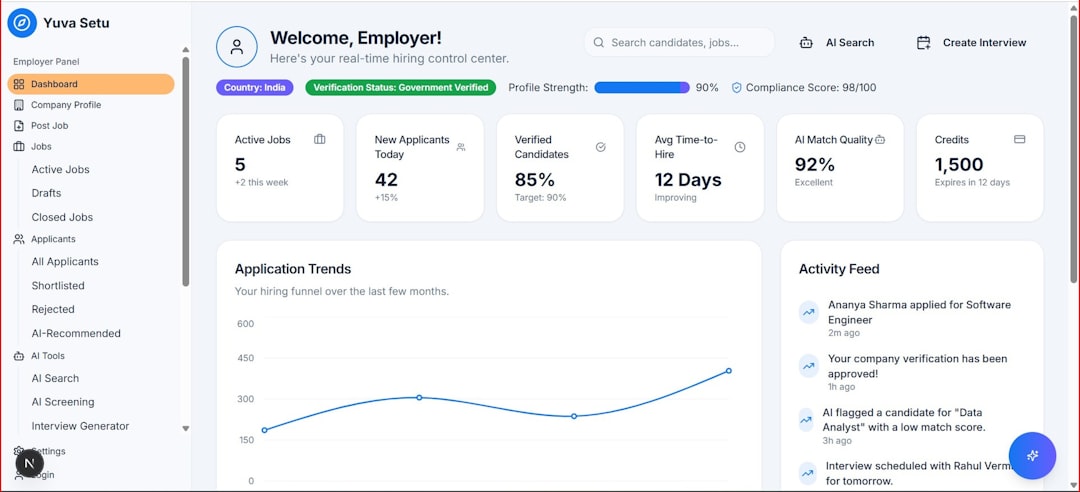
Examples of Business Software in Practice
A small consulting firm may use accounting software for invoices, a CRM to manage prospects, and project management software to organize client deliverables. This combination allows its team to track revenue, follow up with leads, and deliver work on schedule without investing in a complex enterprise system.
A mid-sized e-commerce company may need more integrated tools. It might use inventory management software connected to its online store, payment processor, shipping provider, and customer support platform. When an order is placed, the system can update stock, create a shipping label, notify the customer, and record the sale automatically.
A large manufacturing company may use an ERP platform to connect procurement, production, warehousing, finance, and compliance. In this case, software supports not only daily tasks but also long-term planning, forecasting, and risk management.
Cloud-Based vs. On-Premise Software
Business software is often delivered in two main ways: cloud-based or on-premise.
Cloud-based software is accessed through the internet and usually paid for as a subscription. It is popular because it offers quick deployment, regular updates, remote access, and lower upfront costs. It is often suitable for small and mid-sized businesses, distributed teams, and companies that want flexibility.
On-premise software is installed on company-owned servers or computers. It may provide more control over data, customization, and infrastructure, but it often requires higher initial investment and internal IT support. Some highly regulated industries still prefer this model, although cloud security has improved significantly.
How to Choose the Right Business Software
Selecting business software should be a structured decision rather than a rushed purchase. The wrong system can increase frustration, create data silos, or become expensive to replace.
- Identify the problem first: The company should define what process needs improvement, such as slow reporting, poor lead tracking, or inventory errors.
- Set clear goals: Goals may include reducing manual work by 40%, improving response time, or consolidating three tools into one platform.
- Consider user needs: Employees who will use the software daily should be involved in evaluation and testing.
- Check integrations: The solution should connect with existing systems such as email, payment tools, e-commerce platforms, or accounting software.
- Review scalability: The software should support future users, features, locations, or transaction volume.
- Evaluate security: Important features include role-based access, encryption, backups, compliance support, and activity logs.
- Compare total cost: Decision makers should consider licensing, setup, training, customization, support, migration, and renewal costs.
- Request demos or trials: Hands-on testing reveals whether the interface is practical and whether workflows match real business needs.

Common Mistakes to Avoid
Companies sometimes choose software based only on popularity, price, or a long feature list. However, a feature-rich platform may be unnecessary if employees find it confusing. Another common mistake is ignoring implementation planning. Data migration, employee training, process redesign, and technical setup require time and ownership.
It is also risky to overlook vendor support. A reliable vendor should provide documentation, customer service, updates, and transparent pricing. In many cases, long-term reliability matters more than the lowest monthly fee.
FAQ
What is a business software solution?
A business software solution is a digital tool or platform that helps organizations manage tasks, data, workflows, communication, or decision making.
Which business software is most important for small companies?
Many small companies start with accounting software, CRM software, and project management tools. The best choice depends on the company’s main operational challenge.
Is cloud software better than on-premise software?
Cloud software is often easier to deploy and maintain, while on-premise software may offer more direct control. The better option depends on budget, security requirements, IT resources, and business needs.
How much does business software cost?
Costs vary widely. Some tools charge a small monthly fee per user, while enterprise platforms may require significant setup, customization, and ongoing support expenses.
How can a company know if software is worth the investment?
A company can measure return on investment by tracking saved time, reduced errors, increased sales, faster reporting, improved customer satisfaction, and lower operating costs.








